How many floppy disks would your homepage fill? A high-density floppy held about 1.47 MB, and a modern webpage can reach that by adding up dozens of files that are each only a few hundred kilobytes. To convert kilobytes to megabytes, divide by 1,000. Use the converter above for an instant answer, read why the famous "1.44 MB" label is not what it seems, then try the estimator further down to see how many floppy disks a real page would need.
Kilobyte to Megabyte Formula
MB = kB ÷ 1,000
So 1,000 kB = 1 MB and 1 kB = 0.001 MB. For example, 2,500 kB ÷ 1,000 = 2.5 MB.
This converter uses decimal units. If your file manager shows a slightly different size, it is probably using binary units, where a "kilobyte" is 1,024 bytes (see NIST's guide to binary prefixes).
Common kB to MB Values
| Kilobytes | Megabytes | Example |
|---|---|---|
| 80 kB | 0.08 MB | IBM's 1971 eight-inch read-only disk (about) |
| 110 kB | 0.11 MB | Shugart SA 400 Minifloppy, 1976 (roughly) |
| 360 kB | 0.36 MB | Common double-sided 5.25-inch PC floppy (label) |
| 720 kB | 0.72 MB | 3.5-inch double-density floppy (label) |
| 1,000 kB | 1 MB | Exactly one decimal megabyte |
| 1,024 kB | 1.024 MB | What some software shows as "1 MB" |
| 1,200 kB | 1.2 MB | High-density 5.25-inch floppy (label) |
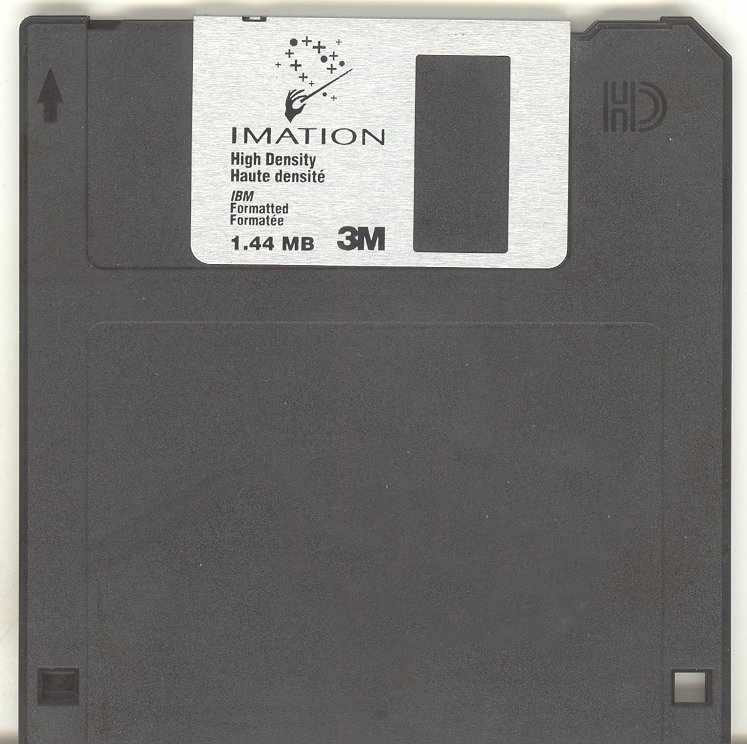
| 1,440 kB | 1.44 MB | The "1.44 MB" label; true capacity 1,474.56 kB |
| 5,000 kB | 5 MB | A 5 MB photo would need about 3.4 high-density floppies |
| 10,000 kB | 10 MB | About 6.8 high-density floppies |
Floppy Disks: When Portable Storage Was Measured in Kilobytes
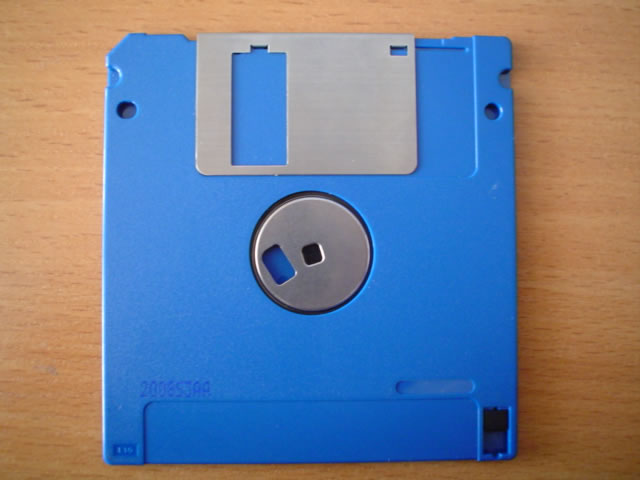
A floppy disk is a removable magnetic disk: a thin, flexible disk coated with magnetic material spins inside a drive, and a head writes and reads patterns that stand for data. The first 8-inch and later 5.25-inch disks lived in flexible jackets, which is where the word floppy comes from. The 3.5-inch version kept a flexible disk inside a rigid case with a sliding shutter, but the name stuck.
From Punched Cards to a Disk You Could Mail
IBM began work on the floppy in 1967. A small team led by David L. Noble was asked for an inexpensive way to load code into the IBM 3330 mainframe storage controller, and the result, code-named Minnow, shipped as the 23FD in 1971: an 8-inch, read-only disk holding about 80 kB, which the Computer History Museum and IBM both equate to roughly 3,000 punched cards. The disk was small enough to post, where cards needed a box. Later versions added writing, and the technology was patented in 1972. The Computer History Museum's 1971 entry and IBM's history of floppy-disk storage tell the fuller story.
Eight-inch equipment was too big for desktop computers. Shugart Associates answered a request from Wang Laboratories for a cheaper drive with the 5.25-inch SA 400 "Minifloppy", announced in 1976 at 110 kB. More tracks, a second side and denser recording pushed 5.25-inch capacities to 360 kB and, in 1984, to the 1.2 MB high-density disk that IBM introduced for the PC. The Computer History Museum's Minifloppy entry records the 1976 drive and notes that in 1982 the Microfloppy Industry Committee agreed a 3.5-inch standard based on a Sony design. IBM says it brought out the 3.5-inch disk with 1.44 MB of storage two years after the 1.2 MB disk.
Why the "1.44 MB" Label Does Not Add Up
The arithmetic starts from the disk's physical layout. A high-density 3.5-inch disk has 80 tracks on each of two sides, 18 sectors on each track and 512 bytes in each sector:
| Step | Calculation | Result |
|---|---|---|
| Sectors on the disk | 80 tracks × 2 sides × 18 sectors | 2,880 sectors |
| Capacity in bytes | 2,880 × 512 | 1,474,560 bytes |
| In binary kilobytes | 1,474,560 ÷ 1,024 | 1,440 KiB |
| The label | 1,440 ÷ 1,000 | "1.44 MB" |
| In decimal megabytes | 1,474,560 ÷ 1,000,000 | 1.47456 MB |
| In binary megabytes | 1,474,560 ÷ 1,048,576 | 1.40625 MiB |
The label divides by 1,024 once and by 1,000 once, so its "megabyte" is 1,024,000 bytes. That is neither the decimal megabyte of 1,000,000 bytes nor the binary mebibyte of 1,048,576 bytes, which is why two sources can quote the same disk's capacity differently. It is also why this page marks the floppy rows in the table above as labels rather than exact conversions.
| Physical format | Example capacity | Historical context |
|---|---|---|
| 8-inch | About 80 kB | IBM's original read-only disk, 1971 |
| 5.25-inch | About 110 kB | Shugart SA 400 Minifloppy, 1976 |
| 5.25-inch | 360 kB | Common double-sided PC format |
| 5.25-inch | 1.2 MB | High-density PC format |
| 3.5-inch | 720 kB | Double-density format |
| 3.5-inch | "1.44 MB" | High-density format containing 1,474,560 bytes |
| 3.5-inch | 2.88 MB | Less common extended-density format |
| 3.5-inch SuperDisk (LS-120) | 120 MB | Backward-compatible format needing a dedicated drive |
| SuperDisk (LS-240) | 240 MB | Later, higher-capacity SuperDisk format |
From Sneakernet to the Save Icon
The floppy let software companies sell programs by post or in shops, and before networks reached most computers people used disks to carry files between machines, a habit called "sneakernet". As programs grew, installs needed more disks: IBM notes that the diskette version of Windows 95 came on 13 diskettes loaded one at a time. At the mid-1990s peak IBM puts sales above 5 billion disks a year.
Then capacity, speed and reliability overtook the format. Recordable CDs, USB drives, memory cards and network transfers took its place, and by the mid-2000s floppies had largely vanished. The icon survived. Many programs still show a floppy disk for "Save", including to people who have never held one.
From Floppy Capacity to Modern Webpage Size
A high-density floppy stored about 1.47 MB. A modern webpage can match or exceed that by combining dozens of much smaller files. For example, 40 kB of HTML, 180 kB of JavaScript, 50 kB of CSS and 550 kB of images add up to 820 kB, or 0.82 MB, which is about 0.56 of a floppy disk.
The estimator below applies the same kB-to-MB relationship to a public webpage. It scans a limited set of discoverable files and reports their known subtotal, so you can see how many small files build a larger page and how many floppy disks that total would fill.
Website Page Size Estimator
Estimate the known size of a public webpage's HTML, images, CSS and JavaScript, then compare the total in decimal kilobytes, megabytes and high-density floppy disks.
Scanning a limited set of resources…
Resource breakdown
Largest known resources
| Resource | Type | Size |
|---|
What the Estimate Includes
The tool checks the page's HTML and a limited set of discoverable images, style sheets and JavaScript files. It does not run the page's JavaScript, so dynamically loaded resources may be absent, and some external servers prevent their files from being measured. The result is therefore a known resource subtotal, not a full browser performance audit.
Results use decimal units: 1 kB = 1,000 bytes and 1 MB = 1,000 kB. One floppy disk is counted as 1,474,560 bytes. For a complete performance test, use a browser-based auditing tool that loads and executes the page.
Sources and More File Size Converters
- IBM: Floppy disk storage: Project Minnow, the 3,000 punched cards, the 1.2 MB and 1.44 MB disks, the 13-diskette Windows 95 and the 5 billion disks a year.
- Computer History Museum: 1971, floppy disk loads mainframe computer data and 1976, minicomputers stimulate floppy disk sales: the 80 kB disk, the 110 kB SA 400 and the 1982 3.5-inch standard.
- NIST: prefixes for binary multiples: kilobyte, kibibyte and the decimal and binary meanings of "megabyte".
The arithmetic in the tables is AbacaDigital's own. Figures on this page are checked against the sources listed. Spotted an error? Contact us.