Search for "GB to kB" and you will see two answers: 1,000,000 and 1,048,576. They are not rival results. The first is the decimal gigabyte, which is what storage devices and this converter use, and the second belongs to the binary gibibyte. To convert gigabytes to kilobytes, multiply by 1,000,000. Use the converter above for a direct result, then use the planner below to estimate how many files of a given size fit in a storage allowance measured in GB.
Gigabyte to Kilobyte Formula
kB = GB × 1,000,000
So 1 GB = 1,000,000 kB and 1 kB = 0.000001 GB. For example, 4 GB × 1,000,000 = 4,000,000 kB.
The other number comes from binary units. A gibibyte (GiB) is 1,073,741,824 bytes and a kibibyte (KiB) is 1,024 bytes, so a gibibyte is 1,024 × 1,024 = 1,048,576 kibibytes. Many sites write that figure as "KB" and "GB", which is why the two answers appear side by side.
| Starting unit | Result | Which system |
|---|---|---|
| 1 GB (1,000,000,000 bytes) | 1,000,000 kB | Decimal, used by this converter |
| 1 GiB (1,073,741,824 bytes) | 1,048,576 KiB | Binary |
| 1 GiB | 1,073,741.824 kB | Binary quantity in decimal kilobytes |
| 1 GB | 976,562.5 KiB | Decimal quantity in binary kilobytes |
A device sold as 32 GB uses the decimal gigabyte, so it holds 32,000,000 kB. An operating system that counts in binary units will show a smaller number of gibibytes for the same device, which is why storage can look "missing". NIST's guide to binary prefixes sets out the decimal and binary names.
Common GB to kB Values
| Gigabytes (GB) | Kilobytes (kB) |
|---|---|
| 0.001 GB | 1,000 kB |
| 0.01 GB | 10,000 kB |
| 0.1 GB | 100,000 kB |
| 0.25 GB | 250,000 kB |
| 0.5 GB | 500,000 kB |
| 1 GB | 1,000,000 kB |
| 2 GB | 2,000,000 kB |
| 5 GB | 5,000,000 kB |
| 10 GB | 10,000,000 kB |
| 25 GB | 25,000,000 kB |
| 32 GB | 32,000,000 kB |
| 64 GB | 64,000,000 kB |
| 100 GB | 100,000,000 kB |
These values use decimal units. Binary units such as GiB and KiB use different factors and should not be substituted when an exact result is required.
How a GB Video Reaches Your Screen in Smaller Pieces
A film held by a streaming provider may occupy several gigabytes, but a television or phone does not wait for the whole file before playback begins. The provider prepares smaller media segments, and the network carries the bytes of each segment in packets.
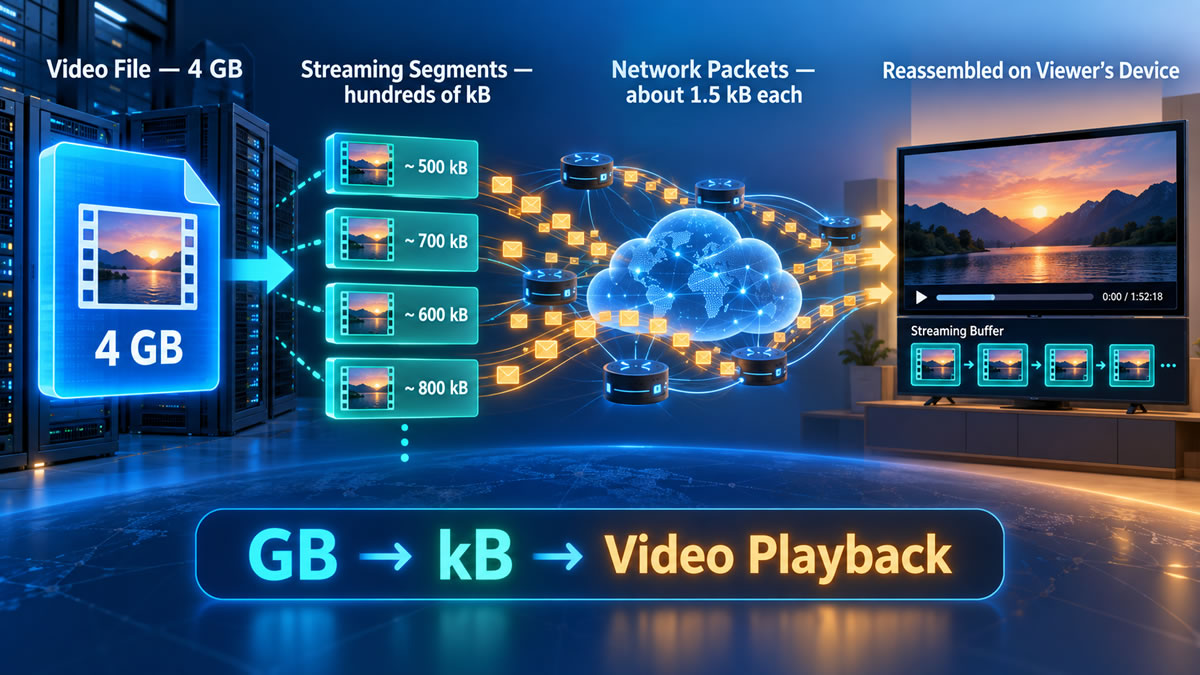
Here is the arithmetic for an illustrative 4 GB film, which is 4,000,000 kB. Suppose it is encoded at 5 megabits per second, which is 625 kB of data every second. At that rate the film lasts 4,000,000 ÷ 625 = 6,400 seconds, about 1 hour 47 minutes. Apple's HLS authoring specification recommends segments of nominally 6 seconds, so each segment carries 6 × 625 = 3,750 kB, and the film divides into about 1,067 segments.
| Quantity | Working | Result |
|---|---|---|
| Whole film | 4 GB × 1,000,000 | 4,000,000 kB |
| Data per second | 5 megabits ÷ 8 | 625 kB |
| Length of film | 4,000,000 ÷ 625 | 6,400 s (about 1 h 47 min) |
| Data per 6-second segment | 625 × 6 | 3,750 kB |
| Number of segments | 6,400 ÷ 6 | about 1,067 |
| Packets per segment | 3,750,000 bytes ÷ about 1,460 | about 2,570 |
| Packets for the whole film | 4,000,000,000 ÷ about 1,460 | about 2.7 million |
The packet figure assumes about 1,460 bytes of video data in each packet, a typical value on an Ethernet network that carries at most 1,500 bytes per packet once headers are counted. It varies between networks, and real traffic also includes protocol and encryption overhead. The result is that 4,000,000 kB becomes millions of packets rather than four million 1 kB packets, and about a thousand segments rather than one file.
Streaming services commonly keep several encoded versions of a programme, so a player can request a higher-bitrate version when the connection is strong and a smaller one when bandwidth falls. Apple's HTTP Live Streaming, published as RFC 8216, and MPEG-DASH both support segmented delivery. The receiving device reassembles the requested data and keeps a short reserve in its playback buffer. The GB-to-kB conversion gives the quantity of data involved, but it does not by itself fix bitrate, quality, packet count or download time.
File Collection and Storage Planner
A storage device may be sold in GB while the files you plan to save are measured in kB. Enter the available capacity and an average file size to estimate how many files can fit. Reserving some capacity helps avoid a plan that assumes every advertised byte is available for your files.
Estimated Storage Plan
This is a planning estimate based on one average file size entered in kB or MB. Real files vary, and filesystem overhead or device formatting can reduce the amount available.
How Many Files Can Fit in 1 GB?
The examples below use one decimal gigabyte, equal to 1,000,000 kB. Actual file sizes vary, so the counts are illustrative rather than product guarantees.
| Example file | Assumed average size | Approximate files per 1 GB |
|---|---|---|
| Short plain-text note | 10 kB | 100,000 |
| Small office document | 100 kB | 10,000 |
| Compact PDF document | 250 kB | 4,000 |
| Optimised web image | 500 kB | 2,000 |
| Compressed photograph | 2,500 kB | 400 |
| Short compressed audio clip | 5,000 kB | 200 |
| Larger document or media file | 10,000 kB | 100 |
Why Real Storage Results Can Differ
The mathematical result assumes that the stated decimal capacity can be divided perfectly by the average file size. A real device also needs a filesystem, directories and other management information, and some capacity may be taken by the operating system, installed applications, recovery files or data already stored.
Small files add another difference. Storage is commonly allocated in blocks or clusters, so a file containing only a few kB may occupy a larger allocation unit, and thousands of tiny files can use more disk space than the sum of their logical sizes suggests. Mixing GB, GiB, kB and KiB, as described in the formula section, can create an apparent disagreement even when the underlying byte count is correct.
Sources and Related File-Size Converters
- NIST: prefixes for binary multiples and the BIPM SI Brochure: decimal prefixes and the binary names.
- Apple: HTTP Live Streaming, RFC 8216 and MPEG-DASH: segmented streaming. The 6-second recommendation is in Apple's HLS authoring specification.
The arithmetic, the planner and the file-count table are AbacaDigital's own, and the film, bitrate and file sizes are illustrations. Figures on this page are checked against the sources listed. Spotted an error? Contact us.