The Apple I came with 4 kB of RAM. A laptop with 16 GB has about four million times as much. To convert kilobytes to gigabytes, divide by 1,000,000. Computer memory, though, has traditionally been counted in binary steps, where the divisor is 1,048,576, so this page shows both answers beside the history. Use the converter above for an instant result, then follow the timeline to see how the capacities changed and what each conversion means.
Kilobyte to Gigabyte Formula
GB = kB ÷ 1,000,000
So 1,000,000 kB = 1 GB and 4 kB = 0.000004 GB. That is the decimal rule used by this converter and by storage makers. Memory documents often meant something else. A "kilobyte" of RAM was usually 1,024 bytes and a "gigabyte" 1,073,741,824 bytes, which the standard names kibibyte (KiB) and gibibyte (GiB), so converting in binary steps divides by 1,024 × 1,024 = 1,048,576.
| Amount | Decimal gigabytes (÷ 1,000,000) | Binary gibibytes, if each "kB" is 1,024 bytes (÷ 1,048,576) |
|---|---|---|
| 4 kB | 0.000004 GB | 0.0000038147 GiB |
| 64 kB | 0.000064 GB | 0.0000610352 GiB |
| 1,024 kB | 0.001024 GB | 0.0009765625 GiB |
| 1,000,000 kB | 1 GB | 0.9536743164 GiB |
| 1,048,576 kB | 1.048576 GB | 1 GiB |
In the last row, 1,048,576 old-style kilobytes of 1,024 bytes make exactly one gibibyte, while 1,048,576 decimal kB make 1.048576 GB. The third column therefore answers "how many gibibytes is this, if the kilobytes are binary", and the second answers the same question for decimal kilobytes. NIST's guide to binary prefixes explains the names. The reverse conversion is on the GB to kB page, which also shows why searches return both 1,000,000 and 1,048,576.
RAM Capacity History: From Kilobytes to Gigabytes
The table lists documented examples, each with its capacity as the maker or museum states it. Old documents wrote "KB" and "MB" for binary quantities, so the table reads the stated figure in binary steps to get the byte count and then converts it in decimal gigabytes and in binary gibibytes. The two columns differ by about 7% at the gigabyte scale. The year is the introduction of the listed product, not the first appearance of that capacity anywhere.
| Year | Example | Stated RAM | Bytes (binary reading) | Decimal GB | Binary GiB |
|---|---|---|---|---|---|
| 1974 | SCELBI-8H (hobbyist configuration) | up to 4 KB | 4,096 | 0.000004096 GB | 0.0000038147 GiB |
| 1976 | Apple I | 4 KB | 4,096 | 0.000004096 GB | 0.0000038147 GiB |
| 1981 | IBM Personal Computer (5150), base configuration | 16 KB | 16,384 | 0.000016384 GB | 0.0000152588 GiB |
| 1984 | Apple Macintosh 128K | 128 KB | 131,072 | 0.000131072 GB | 0.0001220703 GiB |
| 1984 | Apple Macintosh 512K | 512 KB | 524,288 | 0.000524288 GB | 0.0004882813 GiB |
| 1986 | Apple Macintosh Plus | 1 MB | 1,048,576 | 0.001048576 GB | 0.0009765625 GiB |
| 1988 | NeXT Computer, standard configuration | 8 MB | 8,388,608 | 0.008388608 GB | 0.0078125 GiB |
| 1998 | Apple iMac G3 (original) | 32 MB | 33,554,432 | 0.033554432 GB | 0.03125 GiB |
| About 2011 | Typical new personal computer (a 2011 newspaper estimate) | 2 to 4 GB | 2,147,483,648 to 4,294,967,296 | 2.147483648 to 4.294967296 GB | 2 to 4 GiB |
Larger mainframes, research computers and servers often reached a capacity long before it was common in personal computers, and the table says nothing about speed. The 2011 row is a newspaper's estimate of what a typical new computer carried, not a measured average.
When Four Kilobytes Could Run a Computer
Random-access memory, or RAM, is the processor's temporary working space for programs, open documents and active data. Unlike an SSD or hard drive, ordinary system RAM is volatile, so its contents are normally lost when power is removed.
The Scelbi-8H, advertised in March 1974, is described by the Computer History Museum as the first commercially advertised US computer based on a microprocessor, Intel's 8008. The museum's timeline gives it 4 KB of internal memory and interfaces for a cassette tape, a Teletype and an oscilloscope display, and says a 16 KB version for business followed in 1975. Other histories describe the basic kit as having 1 KB, with more memory available as an extra, so "4 KB" is best read as what the hobbyist machine could hold rather than a single fixed specification. Two years later the Apple I came with 4 kB of RAM too.
Four kilobytes left little room. Programmers used compact instructions, simple displays and carefully reused memory on machines without the background services a modern computer expects. The Computer History Museum's 1974 timeline records the Scelbi-8H and its published memory capacity.
From Magnetic Cores to a Chip You Could Buy
Before semiconductor RAM became standard, computers used delay lines, Williams tubes, magnetic drums and magnetic-core memory, tiny magnetic rings threaded with wires. Core memory kept its contents without power and allowed random access, but every bit needed a physical ring, so more capacity meant more assembly work.
In 1966 IBM researcher Robert Dennard came up with a memory cell made of one transistor and one capacitor, in which the charge on the capacitor stands for a bit. The charge leaks away, so the memory has to be refreshed repeatedly, which is why it is called dynamic RAM, or DRAM. IBM filed the patent in 1967 and it was issued in 1968.
The first DRAM chip to sell successfully used a different design. Intel's 1103, launched in October 1970, stored 1,024 bits, or 128 bytes, using three transistors per cell, a design proposed by Honeywell's Bill Regitz and developed at Intel by Joel Karp. Several manufacturers built 4-kilobit chips on Dennard's one-transistor cell by the mid-1970s. A computer's main memory needed many 1103 chips, yet the chip became the first semiconductor memory to challenge core seriously, and by the early 1970s it had largely replaced it. The Computer History Museum's entry for 1970 and IEEE Spectrum's profile of Dennard tell the story.
What a Gigabyte Would Have Cost in 1970
The Computer History Museum says the 1103 was priced at about 1 cent per bit. Converting that price up the unit ladder shows why nobody talked about gigabytes then:
| Quantity | Cost at 1 cent per bit |
|---|---|
| 1 bit | $0.01 |
| 1 byte (8 bits) | $0.08 |
| 1 kB (1,000 bytes) | $80 |
| 1 MB (1,000,000 bytes) | $80,000 |
| 1 GB (1,000,000,000 bytes) | $80,000,000 |
At that price a decimal gigabyte of memory would have cost about $80,000,000, and a binary gibibyte about $85,899,346. These are nominal 1970 dollars, not adjusted for inflation, and a single chip sold at one price, so the figures illustrate the scale of the change rather than a real purchase. Comparing prices fairly across decades means recording the date, currency and what the price covered, then working in cost per kB, MB or GB.
From Memory Chips to Replaceable Modules
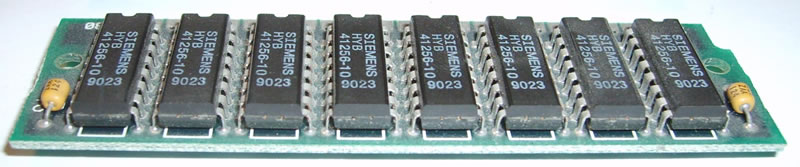
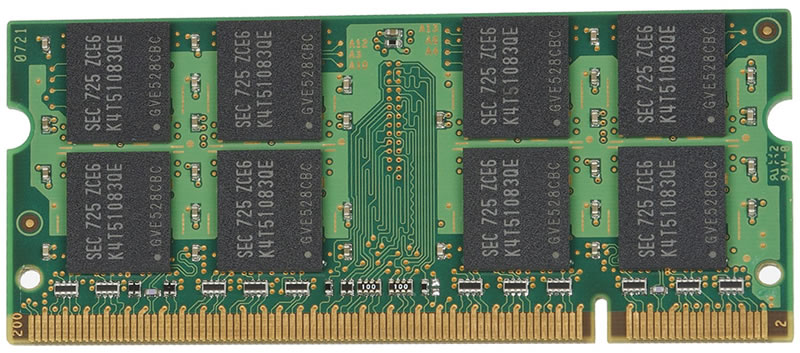
As personal computers became easier to expand, memory chips were grouped on replaceable modules. SIMMs were followed by DIMMs, and laptops used smaller SO-DIMMs. Successive SDRAM and DDR generations raised transfer rates and capacity, but their electrical requirements, notch positions and memory controllers differ. A module's capacity can be converted from kB to GB, yet physical compatibility has to be checked separately.


Why AI Workloads Need Memory Pools Far Beyond a Desktop's
An AI model can have millions or billions of adjustable parameters. Running or training it needs memory for the weights, the input data, intermediate activations and, in training, gradients and optimiser state. The total varies with the model, numerical precision, batch size and whether the system is training or answering queries, so no single figure fits every workload.
Desktop and laptop system memory connects mainly to the CPU. Graphics cards and AI accelerators normally have a separate pool attached to the GPU, often high-bandwidth memory (HBM) placed close to the processor. As of October 2026, NVIDIA's data-centre GPUs give a sense of the scale, and the last two columns convert each capacity into decimal kB and into multiples of the Apple I's 4 kB:
| Accelerator | Memory | Type | In decimal kB | Times the Apple I's 4 kB |
|---|---|---|---|---|
| NVIDIA H100 SXM | 80 GB | HBM3 | 80,000,000 kB | 20,000,000 |
| NVIDIA H200 SXM | 141 GB | HBM3e | 141,000,000 kB | 35,250,000 |
| NVIDIA B200 (shipping systems) | 180 GB | HBM3e | 180,000,000 kB | 45,000,000 |
| Eight-GPU HGX or DGX B200 node | 1,440 GB | HBM3e | 1,440,000,000 kB | 360,000,000 |
These are published examples of specialised accelerator memory, not recommendations for desktop RAM, and they change with each generation. Vendors disagree about the B200: shipping systems list 180 GB per GPU, which gives 1,440 GB (1.44 TB) across eight, while some vendors quote 192 GB for the chip, so check NVIDIA's current HGX component documentation. A kB to GB conversion puts these capacities on a common scale, but it does not say how fast a machine is or whether it suits a task, because capacity, memory type, bandwidth, processor design and software all matter.
Questions and Exam-Style Practice
These questions connect memory capacity with units, history and design. The last four are exam-style questions with the working shown.
Sources
- Computer History Museum: timeline of computer history, 1974: the Scelbi-8H and its 4 KB of memory.
- Computer History Museum: 1970, semiconductors compete with magnetic cores and IEEE Spectrum: Thanks for the Memories: the Intel 1103, its three-transistor cell and price, and Dennard's one-transistor cell and 1968 patent.
- Christian Science Monitor, 2011: the Apple I's 4 kilobytes and the 2 to 4 GB of a typical computer then.
- IBM press release for the IBM Personal Computer and Low End Mac: the 16K base IBM PC and the Macintosh 128K, 512K and Plus capacities.
- NIST: prefixes for binary multiples: kibibyte, gibibyte and the decimal and binary meanings of the prefixes.
- NVIDIA HGX component documentation: accelerator memory capacities, checked against vendor listings in October 2026.
The tables and the price conversion are AbacaDigital's own arithmetic. The NeXT Computer's 8 MB comes from BYTE magazine's November 1988 review and the iMac G3's 32 MB from published model histories. Figures on this page are checked against the sources listed. Spotted an error? Contact us.