How big is the backup of a 2 TB database? Not necessarily 2,000 GB. A database-aware backup might write 600 GB, and a daily incremental might be 40 GB, so one server can hold terabytes of data while its backup files are counted in gigabytes. To convert terabytes to gigabytes, multiply by 1,000. Use the converter above for a direct result, then use the planner below to estimate retained full and incremental backups, future data growth and the reserve needed for a practical storage target.
Terabyte to Gigabyte Formula
GB = TB × 1,000
So 1 TB = 1,000 GB and 2 TB = 2,000 GB. These are the decimal units that drive makers and most storage arrays use. Backup software, operating systems and some appliances instead report binary units, where a gibibyte (GiB) is 1,073,741,824 bytes and a tebibyte (TiB) is 1,024 GiB. The same 2 TB database therefore appears as 1,862.65 GiB, or 1.819 TiB, in a binary report. The figures from this page's example look like this in each system:
| Item | Decimal | Binary GiB | Binary TiB |
|---|---|---|---|
| Protected database | 2,000 GB | 1,862.65 GiB | 1.819 TiB |
| One full backup | 600 GB | 558.79 GiB | 0.546 TiB |
| One incremental backup | 40 GB | 37.25 GiB | 0.036 TiB |
| Whole retained set, before growth | 3,360 GB | 3,129.24 GiB | 3.056 TiB |
Confirm which units a backup report, appliance or storage array uses before comparing it with an estimate, because the gap is about 7% at gigabyte scale and grows to about 10% at terabyte scale. NIST's guide to binary prefixes explains the names. The reverse conversion is on the GB to TB page.
Common Terabyte to Gigabyte Values
| Terabytes | Gigabytes |
|---|---|
| 0.5 TB | 500 GB |
| 1 TB | 1,000 GB |
| 1.5 TB | 1,500 GB |
| 2 TB | 2,000 GB |
| 2.5 TB | 2,500 GB |
| 3 TB | 3,000 GB |
| 4 TB | 4,000 GB |
| 5 TB | 5,000 GB |
| 8 TB | 8,000 GB |
| 10 TB | 10,000 GB |
| 16 TB | 16,000 GB |
| 20 TB | 20,000 GB |
Why a 2 TB Database Might Produce a 600 GB Backup
Production allocation, used database blocks and backup-file size are three different measurements. A 2 TB database allocation may contain space that has never held data. Oracle's RMAN documentation describes two examples: unused block compression, where RMAN skips reading and backing up any database blocks not currently allocated to an object, and null block compression, where it omits any block that has never contained data. Binary compression of the blocks that are written is a separate step.
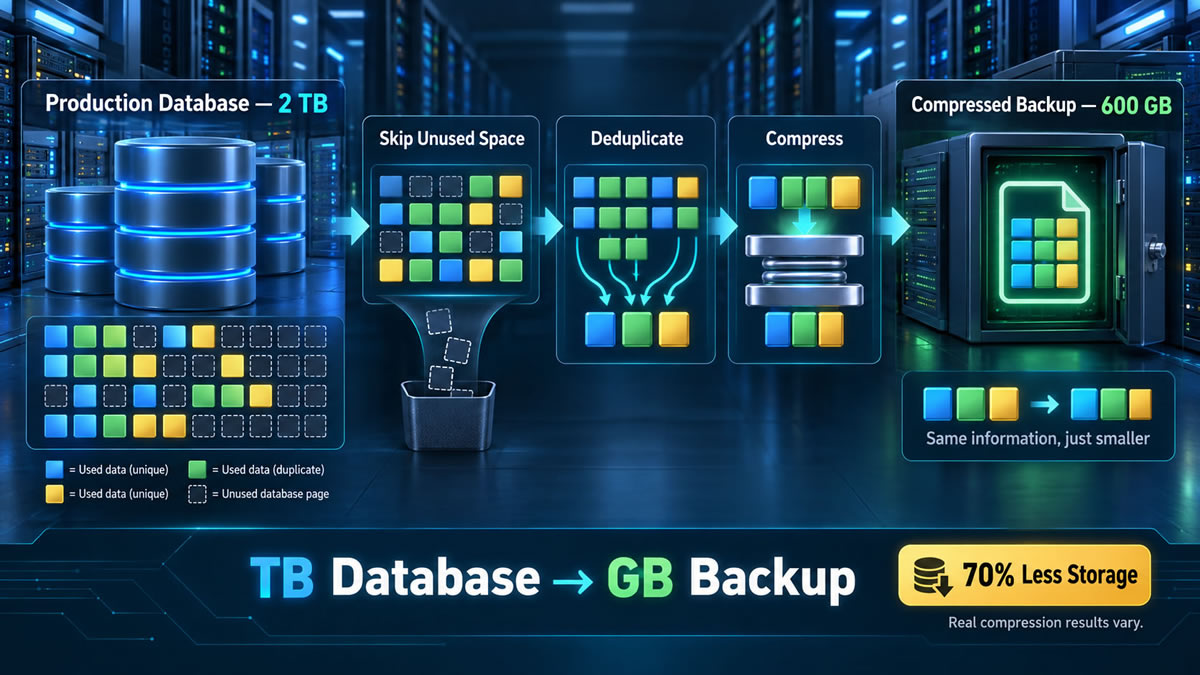
If the 2 TB allocation is treated as 2,000 GB and the backup is 600 GB, the backup is 30% of the source, which is a ratio of about 3.33 to 1 and a saving of 70%. Compression results are often quoted as ratios and planned as percentages, so the table converts between them:
| Ratio | Backup size | Saving | Note |
|---|---|---|---|
| 1.5:1 | 66.7% of source | 33.3% | |
| 2:1 | 50% of source | 50% | |
| 3:1 | 33.3% of source | 66.7% | Microsoft's example: about 66% saved |
| 3.33:1 | 30% of source | 70% | The 2 TB to 600 GB example |
| 5:1 | 20% of source | 80% | |
| 10:1 | 10% of source | 90% |
The reduction can be legitimate, but it is not a universal ratio. Microsoft's SQL Server documentation says the compression ratio of a backup depends on the data, that character data compresses more than other types, and that encrypted data compresses significantly less than the same data unencrypted. Repeated structured data may shrink more and encrypted or already compressed content much less.
Incremental backups add another scale. A 2 TB database might change by 40 GB in a day, so an incremental can be much smaller than a new full backup. Oracle's documentation notes that incremental backups capture changes block by block and are generally smaller than a full backup unless every block has changed. The retention policy must still keep the base backup and every dependent recovery component.
Server Backup Capacity Planner
Enter the current protected-data size, the expected backup ratios, the retention policy and the growth forecast. The planner estimates a future retention set in GB and TB, adds reserve capacity and rounds the result up to a practical storage recommendation. Results update as you type.
Estimated Future Backup Capacity
This is a capacity-planning estimate. It does not model transaction logs, synthetic full backups, deduplication across backup sets, replication copies, immutable copies, RAID overhead or cloud-provider billing rules unless you include them in the ratios or reserve.
How the Backup Planner Works
Data growth is compounded across the selected number of months. The planner then applies the full-backup and incremental percentages to that future source size. For a conservative steady-state estimate it treats every retained backup as though it were created at the forecast size, rather than assuming older backups will always stay smaller. The retention total combines all retained full backups with the incrementals attached to each full, and the reserve is added afterwards. The recommendation rounds up to the next convenient size from the series 1, 2, 4, 6, 8, 10, 12, 14, 16, 18, 20, 22, 24, 30, 36, 40, 48, 60, 72, 80 and 100 TB, and above that to the next 10 TB. It means usable backup capacity, not the labels on the disks in a RAID array.
Example Retention Policy Before Growth
| Backup component | Assumption | Estimated size |
|---|---|---|
| One full backup | 30% of 2 TB | 600 GB |
| One incremental backup | 2% of 2 TB | 40 GB |
| Four retained full backups | 4 × 600 GB | 2,400 GB |
| Six incrementals per full | 24 × 40 GB | 960 GB |
| Total before growth or reserve | 2,400 GB + 960 GB | 3,360 GB = 3.36 TB |
The Same Policy with the Planner's Default Growth and Reserve
| Step | Result | How |
|---|---|---|
| Forecast protected data | 2,851.5 GB (2.8515 TB) | 2 TB grown 3% a month for 12 months |
| One full backup | 855.5 GB | 30% of the forecast data |
| One incremental backup | 57 GB | 2% of the forecast data |
| Four retained full backups | 3,421.8 GB | 4 × one full backup |
| 24 retained incrementals | 1,368.7 GB | 4 × 6 × one incremental |
| Retention set before reserve | 4,790.6 GB (4.7906 TB) | Fulls plus incrementals |
| Required after a 20% reserve | 5,748.7 GB (5.7487 TB) | Retention set × 1.2 |
| Recommended usable capacity | 6 TB (6,000 GB) | Next convenient size up |
Growth and reserve lift the requirement from 3.36 TB to about 5.75 TB, so the recommendation is 6 TB rather than the 4 TB that the before-growth figure alone would suggest.
Retention, Restore Chains and Recovery Testing
Full and Incremental Backups Serve Different Roles
A full backup establishes a recovery base and incrementals record changes according to the product's strategy. Incrementals reduce routine storage and transfer, but recovery may depend on the correct full backup and every required link in its chain.
Compression and Deduplication Are Separate
Compression encodes patterns more efficiently within backup data, while deduplication stores identical chunks once. An environment can use either technique, both or neither, so take ratios from reports on your own workload rather than a generic figure.
Capacity Does Not Prove Recoverability
A small, successful-looking backup file does not prove an application can be restored. NIST's National Cybersecurity Center of Excellence guide on protecting data from ransomware and other data loss events, written for managed service providers, recommends conducting, maintaining and testing backup files. It advises keeping some backups offline, keeping copies of credentials and encryption keys, setting a recovery time objective, and monitoring backup processes for failures. Run realistic recovery exercises and treat the capacity figure as only one input.
Server Backup Capacity Questions
Sources and Related Converters
- Oracle: RMAN backup concepts: unused block compression, null block compression and binary compression of backup sets.
- Microsoft: backup compression (SQL Server): how the compression ratio depends on the data and on encryption.
- NIST NCCoE: Protecting data from ransomware and other data loss events: conducting, maintaining and testing backup files.
- NIST: prefixes for binary multiples: gibibyte, tebibyte and the decimal and binary meanings of the prefixes.
The conversions, the example policy and the planner are AbacaDigital's own arithmetic. The compression ratios and change rates are illustrations, so use measured figures from your own backup reports. This page is general planning information, not advice on a particular system. Figures on this page are checked against the sources listed. Spotted an error? Contact us.